It happened again. This time all of the sensors aren't updating.
I restarted GOverlayPlus after saving logs and screenshots, and it started working fine. The HWinfo plugin exceptions didn't appear this time.
Is there a way for Goverlay to automatically save to log file on startup?
Maybe even save it every 5 mins instead of continuously?
I believe all the SocketServer info messages cleared the oldest messages, since I did not notice the bug until hours after I booted my pc up.
Anyways, I pasted the exception messages, which didn't get cleared.
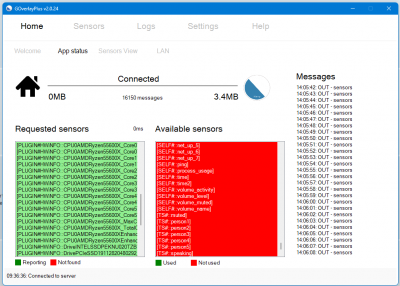
App status tab showed HWinfo sensors (in screenshot below), but I did not see any sensors in the 'Sensors View' tab
Exceptions:
- Code: Select all
6/2/2024 9:36:47 AM:Sensors: PLUGIN - Error on ListSensors (Plugin): HWiNFO has an error and cant load sensors: An item with the same key has already been added. ::    at System.ThrowHelper.ThrowArgumentException(ExceptionResource resource)
   at System.Collections.Generic.Dictionary`2.Insert(TKey key, TValue value, Boolean add)
   at System.Collections.Generic.Dictionary`2.Add(TKey key, TValue value)
   at GOverlayPlugin.HWInfo.Plugin.ListSensors() in D:\VB\goverlay\GOverlayPlus\bin\Debug\Plugins\Examples\hwinfo\Plugin.vb:line 74
   at GOverlayPlus.Sensor_Plugins.ListSensors()
6/2/2024 9:36:47 AM:Sensors: PLUGIN - Error on ListSensors (Plugin): HWiNFO has an error and cant load sensors: An item with the same key has already been added. ::    at System.ThrowHelper.ThrowArgumentException(ExceptionResource resource)
   at System.Collections.Generic.Dictionary`2.Insert(TKey key, TValue value, Boolean add)
   at System.Collections.Generic.Dictionary`2.Add(TKey key, TValue value)
   at GOverlayPlugin.HWInfo.Plugin.ListSensors() in D:\VB\goverlay\GOverlayPlus\bin\Debug\Plugins\Examples\hwinfo\Plugin.vb:line 74
   at GOverlayPlus.Sensor_Plugins.ListSensors()
6/2/2024 9:36:46 AM:Sensors: PLUGIN - Error on ListSensors (Plugin): HWiNFO has an error and cant load sensors: An item with the same key has already been added. ::    at System.ThrowHelper.ThrowArgumentException(ExceptionResource resource)
   at System.Collections.Generic.Dictionary`2.Insert(TKey key, TValue value, Boolean add)
   at System.Collections.Generic.Dictionary`2.Add(TKey key, TValue value)
   at GOverlayPlugin.HWInfo.Plugin.ListSensors() in D:\VB\goverlay\GOverlayPlus\bin\Debug\Plugins\Examples\hwinfo\Plugin.vb:line 74
   at GOverlayPlus.Sensor_Plugins.ListSensors()
6/2/2024 9:36:42 AM:Sensors: PLUGIN - Error on ListSensors (Plugin): HWiNFO has an error and cant load sensors: An item with the same key has already been added. ::    at System.ThrowHelper.ThrowArgumentException(ExceptionResource resource)
   at System.Collections.Generic.Dictionary`2.Insert(TKey key, TValue value, Boolean add)
   at System.Collections.Generic.Dictionary`2.Add(TKey key, TValue value)
   at GOverlayPlugin.HWInfo.Plugin.ListSensors() in D:\VB\goverlay\GOverlayPlus\bin\Debug\Plugins\Examples\hwinfo\Plugin.vb:line 74
   at GOverlayPlus.Sensor_Plugins.ListSensors()
6/2/2024 9:36:42 AM:Sensors: PLUGIN - Error on ListSensors (Plugin): HWiNFO has an error and cant load sensors: An item with the same key has already been added. ::    at System.ThrowHelper.ThrowArgumentException(ExceptionResource resource)
   at System.Collections.Generic.Dictionary`2.Insert(TKey key, TValue value, Boolean add)
   at System.Collections.Generic.Dictionary`2.Add(TKey key, TValue value)
   at GOverlayPlugin.HWInfo.Plugin.ListSensors() in D:\VB\goverlay\GOverlayPlus\bin\Debug\Plugins\Examples\hwinfo\Plugin.vb:line 74
   at GOverlayPlus.Sensor_Plugins.ListSensors()
6/2/2024 9:36:41 AM:Sensors: PLUGIN - Error on ListSensors (Plugin): HWiNFO has an error and cant load sensors: An item with the same key has already been added. ::    at System.ThrowHelper.ThrowArgumentException(ExceptionResource resource)
   at System.Collections.Generic.Dictionary`2.Insert(TKey key, TValue value, Boolean add)
   at System.Collections.Generic.Dictionary`2.Add(TKey key, TValue value)
   at GOverlayPlugin.HWInfo.Plugin.ListSensors() in D:\VB\goverlay\GOverlayPlus\bin\Debug\Plugins\Examples\hwinfo\Plugin.vb:line 74
   at GOverlayPlus.Sensor_Plugins.ListSensors()
6/2/2024 9:36:41 AM:Sensors: PLUGIN - Error on ListSensors (Plugin): HWiNFO has an error and cant load sensors: An item with the same key has already been added. ::    at System.ThrowHelper.ThrowArgumentException(ExceptionResource resource)
   at System.Collections.Generic.Dictionary`2.Insert(TKey key, TValue value, Boolean add)
   at System.Collections.Generic.Dictionary`2.Add(TKey key, TValue value)
   at GOverlayPlugin.HWInfo.Plugin.ListSensors() in D:\VB\goverlay\GOverlayPlus\bin\Debug\Plugins\Examples\hwinfo\Plugin.vb:line 74
   at GOverlayPlus.Sensor_Plugins.ListSensors()
6/2/2024 9:36:41 AM:Sensors: SELF - Try running on CMD: "lodctr /R" and reboot to see if it fixes the issue.
6/2/2024 9:36:41 AM:Sensors: SELF - Error on ListSensors (PerfMon): Failed to initialize because CategoryName is missing.   at Microsoft.VisualBasic.CompilerServices.Symbols.Container.InvokeMethod(Method TargetProcedure, Object[] Arguments, Boolean[] CopyBack, BindingFlags Flags)
   at Microsoft.VisualBasic.CompilerServices.NewLateBinding.ObjectLateGet(Object Instance, Type Type, String MemberName, Object[] Arguments, String[] ArgumentNames, Type[] TypeArguments, Boolean[] CopyBack)
   at Microsoft.VisualBasic.CompilerServices.NewLateBinding.LateGet(Object Instance, Type Type, String MemberName, Object[] Arguments, String[] ArgumentNames, Type[] TypeArguments, Boolean[] CopyBack)
   at GOverlayPlus.Sensor_Self.ForceRefreshActiveSensors(Object refreshList)
   at GOverlayPlus.Sensor_Self.ListSensors()
6/2/2024 9:36:41 AM:SocketServer - LAN - Client 192.168.69.156:39556 Invalid data receieved: ��
6/2/2024 9:36:35 AM:Sensors: PLUGIN - PluginServices - Error loading plugin APCUPS, Version=0.0.0.0, Culture=neutral, PublicKeyToken=null: Exception has been thrown by the target of an invocation.    at System.RuntimeTypeHandle.CreateInstance(RuntimeType type, Boolean publicOnly, Boolean noCheck, Boolean& canBeCached, RuntimeMethodHandleInternal& ctor, Boolean& bNeedSecurityCheck)
   at System.RuntimeType.CreateInstanceSlow(Boolean publicOnly, Boolean skipCheckThis, Boolean fillCache, StackCrawlMark& stackMark)
   at System.Activator.CreateInstance(Type type, Boolean nonPublic)
   at System.RuntimeType.CreateInstanceImpl(BindingFlags bindingAttr, Binder binder, Object[] args, CultureInfo culture, Object[] activationAttributes, StackCrawlMark& stackMark)
   at System.Activator.CreateInstance(Type type, BindingFlags bindingAttr, Binder binder, Object[] args, CultureInfo culture, Object[] activationAttributes)
   at System.Reflection.Assembly.CreateInstance(String typeName, Boolean ignoreCase, BindingFlags bindingAttr, Binder binder, Object[] args, CultureInfo culture, Object[] activationAttributes)
   at GOverlayPlus.Sensor_Plugins.loadPlugin(Assembly objDLL, String strInterface)
6/2/2024 9:36:34 AM:Error creating/updating crash dump WER config
Thank you
 Posted: Wed May 22, 2024 10:27 pm
 )
)