Profiles shared thru the GOverlay APP for LCDSysInfo 3.5 ONLY.
-
-
- 2 Replies
- 10449 Views
- Last post by skyhigh24

Sat Dec 01, 2018 12:22 pm
-
-
- 2 Replies
- 10001 Views
- Last post by skyhigh24
Sat Dec 01, 2018 12:22 pm
-
-
- 2 Replies
- 9928 Views
- Last post by skyhigh24
Sat Dec 01, 2018 12:21 pm
-
-
- 2 Replies
- 9468 Views
- Last post by skyhigh24
Sat Dec 01, 2018 12:21 pm
-
-
Profile: Republic of Drivers MOD (LCD2)

by
skyhigh24 » Sun Apr 29, 2018 11:44 am
This Profile is Based on DooMknight 87´s "Republic of Drivers Blue Edition (LCD2)", Thank you for your Awesome Work!
In my case the Original "RoD"- Profile doesn´t fulfill my needs, so i Modified it.
The Original Profile could be downloaded with this Link:
viewtopic.php?f=6&t=376Sensor Data is Provided by the OpenHardwareMonitor
- 3 Replies
- 14094 Views
- Last post by skyhigh24
Sat Dec 01, 2018 12:11 pm
-
-
- 0 Replies
- 15432 Views
- Last post by lucassiglo21
Mon Nov 05, 2018 12:31 am
-
-
- 0 Replies
- 15382 Views
- Last post by lucassiglo21
Mon Nov 05, 2018 12:28 am
-
-
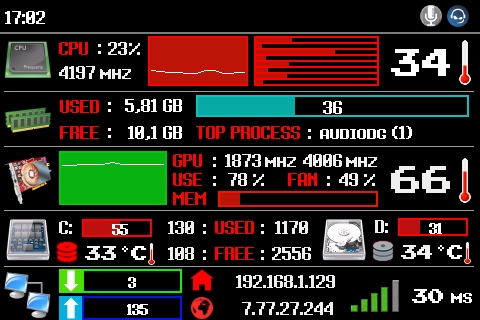
Profile: Advanced Info Profile v1.3 (LCD2)
by
DooMknight87 » Mon May 08, 2017 5:50 pm
[img:3codtm71]https://s15.postimg.cc/oxsq2bdl7/aip.png[/img:3codtm71]
[quote:3codtm71][b:3codtm71]Update 1.3:[/b:3codtm71]
Converted all images to bmp format because in the newer versions the png format don't work. Now all the images seems to work[/quote:3codtm71]
[quote:3codtm71][b:3codtm71]Update 1.2:[/b:3codtm71]
The order of the elements has been restructured, now when the profile is loaded the elements are displayed in a more sophisticated way.
Added different images for the CPU & GPU thermometers, now represent the real value of the sensor & Reworked the "ping status" images for better representation:
[img:3codtm71]https://s15.postimg.cc/r6q5hspbf/ping.gif[/img:3codtm71] [img:3codtm71]https://s15.postimg.cc/jdzhptr23/temp.gif[/img:3codtm71]
Changed the name of the elements in the editor for better ones:
[url=https://postimg.cc/image/4jawbmubr/:3codtm71][img:3codtm71]https://s15.postimg.cc/4jawbmubr/conf.png[/img:3codtm71][/url:3codtm71]
Updated the TS3 icon with the new Teamspeak logo, also updated the mic images for better fit with the new icon. Download below.
[attachment=2:3codtm71]ts3icons.rar[/attachment:3codtm71]
New splash image can be downloaded here: [url=http://www.goverlay.com/forum/download/file.php?id=198:3codtm71]download[/url:3codtm71]
[img:3codtm71]http://www.goverlay.com/forum/download/file.php?id=197&t=1[/img:3codtm71]
[/quote:3codtm71]
[quote:3codtm71]Update 1.1:
Added write state to disk sensors.
Changed profile name to one more suitable.[/quote:3codtm71]
- 9 Replies
- 30705 Views
- Last post by DooMknight87
Fri Sep 21, 2018 5:48 pm
-
-
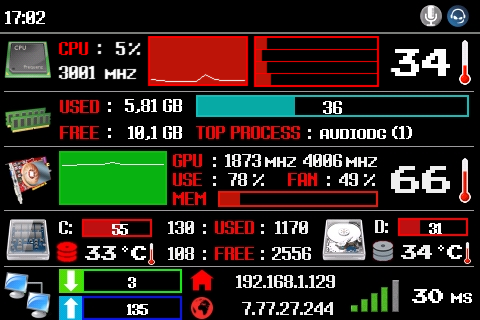
Profile: Advanced Info Profile 4Core version (LCD2)
by
DooMknight87 » Sat Jun 23, 2018 2:36 pm
[img:olxs4cyc]https://s15.postimg.cc/536og7dt7/aip4c.png[/img:olxs4cyc]
[quote:olxs4cyc][b:olxs4cyc]Update 1.3:[/b:olxs4cyc]
Converted all images to bmp format because in the newer versions the png format don't work. Now all the images seems to work[/quote:olxs4cyc]
[quote:olxs4cyc][b:olxs4cyc]Update 1.2:[/b:olxs4cyc]
The order of the elements has been restructured, now when the profile is loaded the elements are displayed in a more sophisticated way.
Added different images for the CPU & GPU thermometers, now represent the real value of the sensor & Reworked the "ping status" images for better representation:
[img:olxs4cyc]https://s15.postimg.cc/r6q5hspbf/ping.gif[/img:olxs4cyc] [img:olxs4cyc]https://s15.postimg.cc/jdzhptr23/temp.gif[/img:olxs4cyc]
Changed the name of the elements in the editor for better ones:
[url=https://postimg.cc/image/4jawbmubr/:olxs4cyc][img:olxs4cyc]https://s15.postimg.cc/4jawbmubr/conf.png[/img:olxs4cyc][/url:olxs4cyc]
Updated the TS3 icon with the new Teamspeak logo, also updated the mic images for better fit with the new icon. Download below.
[attachment=0:olxs4cyc]ts3icons.rar[/attachment:olxs4cyc]
New splash image can be downloaded here: [url=http://www.goverlay.com/forum/download/file.php?id=198:olxs4cyc]download[/url:olxs4cyc]
[img:olxs4cyc]http://www.goverlay.com/forum/download/file.php?id=197&t=1[/img:olxs4cyc]
[/quote:olxs4cyc]
[quote:olxs4cyc]Update 1.1:
Added write state to disk sensors.
Changed profile name to one more suitable.[/quote:olxs4cyc]
- 1 Replies
- 8233 Views
- Last post by DooMknight87
Fri Sep 21, 2018 5:41 pm
-
-
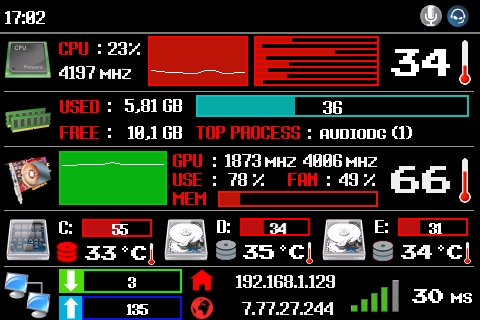
Profile: Advanced Info Profile 3Disk version (LCD2)
by
DooMknight87 » Sat Jun 23, 2018 2:40 pm
[img:34x9582d]https://s15.postimg.cc/jmdthlz8b/aip3d.png[/img:34x9582d]
[quote:34x9582d][b:34x9582d]Update 1.3:[/b:34x9582d]
Converted all images to bmp format because in the newer versions the png format don't work. Now all the images seems to work[/quote:34x9582d]
[quote:34x9582d][b:34x9582d]Update 1.2:[/b:34x9582d]
The order of the elements has been restructured, now when the profile is loaded the elements are displayed in a more sophisticated way.
Added different images for the CPU & GPU thermometers, now represent the real value of the sensor & Reworked the "ping status" images for better representation:
[img:34x9582d]https://s15.postimg.cc/r6q5hspbf/ping.gif[/img:34x9582d] [img:34x9582d]https://s15.postimg.cc/jdzhptr23/temp.gif[/img:34x9582d]
Changed the name of the elements in the editor for better ones:
[url=https://postimg.cc/image/4jawbmubr/:34x9582d][img:34x9582d]https://s15.postimg.cc/4jawbmubr/conf.png[/img:34x9582d][/url:34x9582d]
Updated the TS3 icon with the new Teamspeak logo, also updated the mic images for better fit with the new icon. Download below.
[attachment=0:34x9582d]ts3icons.rar[/attachment:34x9582d]
New splash image can be downloaded here: [url=http://www.goverlay.com/forum/download/file.php?id=198:34x9582d]download[/url:34x9582d]
[img:34x9582d]http://www.goverlay.com/forum/download/file.php?id=197&t=1[/img:34x9582d]
[/quote:34x9582d]
[quote:34x9582d]Update 1.1:
Added write state to disk sensors.
Changed profile name to one more suitable.[/quote:34x9582d]
- 1 Replies
- 8029 Views
- Last post by DooMknight87
Fri Sep 21, 2018 5:41 pm
-
-
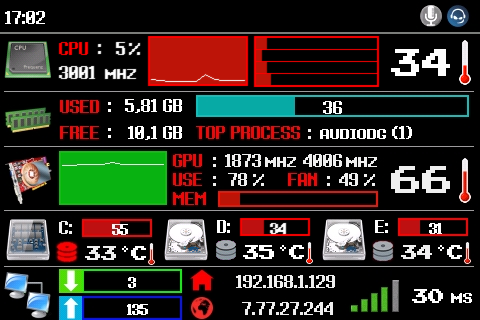
Profile: Advanced Info Profile 4Core 3Disk version (LCD2)
by
DooMknight87 » Sat Jun 23, 2018 2:42 pm
[img:3cnsb0uv]https://s15.postimg.cc/gfj9xzu7v/aip4c3d.png[/img:3cnsb0uv]
[quote:3cnsb0uv][b:3cnsb0uv]Update 1.3:[/b:3cnsb0uv]
Converted all images to bmp format because in the newer versions the png format don't work. Now all the images seems to work[/quote:3cnsb0uv]
[quote:3cnsb0uv][b:3cnsb0uv]Update 1.2:[/b:3cnsb0uv]
The order of the elements has been restructured, now when the profile is loaded the elements are displayed in a more sophisticated way.
Added different images for the CPU & GPU thermometers, now represent the real value of the sensor & Reworked the "ping status" images for better representation:
[img:3cnsb0uv]https://s15.postimg.cc/r6q5hspbf/ping.gif[/img:3cnsb0uv] [img:3cnsb0uv]https://s15.postimg.cc/jdzhptr23/temp.gif[/img:3cnsb0uv]
Changed the name of the elements in the editor for better ones:
[url=https://postimg.cc/image/4jawbmubr/:3cnsb0uv][img:3cnsb0uv]https://s15.postimg.cc/4jawbmubr/conf.png[/img:3cnsb0uv][/url:3cnsb0uv]
Updated the TS3 icon with the new Teamspeak logo, also updated the mic images for better fit with the new icon. Download below.
[attachment=0:3cnsb0uv]ts3icons.rar[/attachment:3cnsb0uv]
New splash image can be downloaded here: [url=http://www.goverlay.com/forum/download/file.php?id=198:3cnsb0uv]download[/url:3cnsb0uv]
[img:3cnsb0uv]http://www.goverlay.com/forum/download/file.php?id=197&t=1[/img:3cnsb0uv]
[/quote:3cnsb0uv]
[quote:3cnsb0uv]Update 1.1:
Added write state to disk sensors.
Changed profile name to one more suitable.[/quote:3cnsb0uv]
- 5 Replies
- 15687 Views
- Last post by DooMknight87
Fri Sep 21, 2018 5:40 pm
-
-
- 0 Replies
- 15406 Views
- Last post by belgianfred2
Thu Sep 06, 2018 8:41 pm
-
-
Profile: Notebook ICU Monitor v1
by
Mephisto » Sun Aug 05, 2018 10:49 am
Hi,
my insipration for this profile was a ICU Monitor from Philips, like this one:
[img:3gblrp1j]https://images.philips.com/is/image/philipsconsumer/7710dd50add64c368343a77c015281ae?$jpglarge$&bgc=000000&wid=498&hei=280[/img:3gblrp1j]
best regards,
Mephisto
- 0 Replies
- 15216 Views
- Last post by Mephisto
Sun Aug 05, 2018 10:49 am
-
-
- 0 Replies
- 14131 Views
- Last post by roberto77i
Tue Jun 12, 2018 12:22 pm
-
-
- 0 Replies
- 15227 Views
- Last post by roberto77i
Wed Jun 06, 2018 2:06 pm
-
-
- 0 Replies
- 15591 Views
- Last post by Timm0
Mon Jun 04, 2018 6:20 pm
-
-
Profile: Advanced Info profile MOD
by
skyhigh24 » Sun Apr 29, 2018 12:03 pm
This Profile is Based on DooMknight 87´s "Advanced Info profile for LCD2", Thank you again for your Awesome Work!
In my case the Original Profile doesn´t fulfill my needs, so i Modified it.
Mods:
- Font Changed
- Colors Changed
- Some Icons Changed
- Show Audio Volume of the Active Audio Device
- 4 Core Bars (instead of 8 Core)
- Supports 4 Hard Drives
- Supports Fan Speed (6 Fans)
The Original Profile could be downloaded with this Link:
viewtopic.php?f=6&t=325Sensor Data is Provided by the OpenHardwareMonitor
- 0 Replies
- 15148 Views
- Last post by skyhigh24
Sun Apr 29, 2018 12:03 pm
-
-
Profile: emplate-whitestatslcd black edition
by
enderep12 » Thu Apr 12, 2018 4:39 pm
My black version of the "emplate-whitestatslcd sam edition" that can be found here:
viewtopic.php?f=6&t=404#p1836All credits go to UncleSam, I just made a version with dark/black background of this template. I switched out the CPU and GPU icons since the defaults were looking a bit buggy and I also use different icons for the Teamspeak talking/not talking in the status bar.
- 0 Replies
- 14262 Views
- Last post by enderep12
Thu Apr 12, 2018 4:39 pm
-
-
- 0 Replies
- 14723 Views
- Last post by anandabhakti
Mon Mar 26, 2018 5:55 pm
-
-
- 0 Replies
- 14338 Views
- Last post by roberto77i
Thu Mar 08, 2018 11:27 am
-
-
Republic of Drivers Blue Edition (LCD2)
by
DooMknight87 » Tue Aug 29, 2017 3:31 pm
Blue Edition of my profile inspired on ASUS RoG products. It has all the information a gamer needs. Shows nice animations, all with an aggressive but elegant style.
The needles show the use of cpu (left) and gpu (center). The white bars inside those two gauges show the temperature, also shows it numerically in the center.
On the right is the memory indicator, where the sidebar shows the memory used, in addition to displaying the numerical values.
Finally, below I've put the information for an SSD and HDD, an animated icon of disks & connectivity that is activated when there is network data flow, showing upload and download and the volume icon.
- 2 Replies
- 12758 Views
- Last post by TheLaGmAn
Thu Nov 02, 2017 2:58 pm
-
-
Profile: emplate-whitestatslcd sam edition
by
UncleSam » Mon Oct 09, 2017 7:38 pm
my edition of the "emplate-whitestatslcd2" layout
- added top notification bar
- removed hdd and space icons
- added down- and upload plots included ping
- added teamspeak panel
- added date and fps at bottom right
- 0 Replies
- 16199 Views
- Last post by UncleSam
Mon Oct 09, 2017 7:38 pm
-
-
Republic of Drivers Green Edition (LCD2)
by
DooMknight87 » Tue Aug 29, 2017 3:18 pm
Green Edition of my profile inspired on ASUS RoG products. It has all the information a gamer needs. Shows nice animations, all with an aggressive but elegant style.
The needles show the use of cpu (left) and gpu (center). The white bars inside those two gauges show the temperature, also shows it numerically in the center.
On the right is the memory indicator, where the sidebar shows the memory used, in addition to displaying the numerical values.
Finally, below I've put the information for an SSD and HDD, an animated icon of disks & connectivity that is activated when there is network data flow, showing upload and download and the volume icon.
- 0 Replies
- 14094 Views
- Last post by DooMknight87
Tue Aug 29, 2017 3:18 pm
-
-
- 0 Replies
- 14751 Views
- Last post by XIIIJAMAICAN
Thu Aug 17, 2017 12:30 am
-
-
Profile: Simple Blue
by
TheLaGmAn » Sun Jun 18, 2017 3:25 pm
A simple blue template with date, time, weather and cpu/gpu temperatures and just cpu usage
- 0 Replies
- 14139 Views
- Last post by TheLaGmAn
Sun Jun 18, 2017 3:25 pm
Return to Board index
Who is online
Users browsing this forum: No registered users and 6 guests
Forum permissions
You cannot post new topics in this forum
You cannot reply to topics in this forum
You cannot edit your posts in this forum
You cannot delete your posts in this forum
You cannot post attachments in this forum